jetson orin nano使用TensorRT-LLM跑大模型
准备
硬件信息
硬件信息如下:
sudo cat /proc/device-tree/model
NVIDIA Jetson Orin NX Enginejetson_releasee Developer Kit(base) nano@nano-desktop:~$ jetson_release
Software part of jetson-stats 4.3.2 - (c) 2024, Raffaello Bonghi
Model: NVIDIA Jetson Orin NX Engineering Reference Developer Kit - Jetpack 6.2 [L4T 36.4.3]
NV Power Mode[0]: 15W
Serial Number: [XXX Show with: jetson_release -s XXX]
Hardware:
 - P-Number: p3767-0003
 - Module: NVIDIA Jetson Orin Nano (8GB ram)
Platform:
 - Distribution: Ubuntu 22.04 Jammy Jellyfish
 - Release: 5.15.148-tegra
jtop:
 - Version: 4.3.2
 - Service: Active
超级模式
设置电源为超级性能模式,点击 Ubuntu 桌面顶部栏右侧的 NVIDIA 图标
Power mode
    0: 15W
    1: 25W
    2: MAXN SUPER
如果没有MAXN SUPER,执行下面的命令安装。
sudo apt remove nvidia-l4t-bootloader
sudo apt install nvidia-l4t-bootloader
sudo reboot
如果还是无法配置的话,参考下:super mode
安装docker
本文主要使用https://github.com/dusty-nv/jetson-containers docker来进行部署测试,免去不少的环境搭建过程。
如果设备没有安装docker,执行下面命令进行安装docker。
sudo apt-get update
sudo apt-get install -y docker.io nvidia-container-toolkit
sudo usermod -aG docker $USER
sudo systemctl daemon-reload
sudo systemctl restart docker
接着容器启动拉取代码,然后拉取docker镜像:
git clone https://github.com/dusty-nv/jetson-containers.git
./jetson-containers/run.sh -v $(pwd)/model_zoo:/opt/tensorrt_llm/models $(autotag tensorrt_llm)
下载模型
先下载一个模型
# Qwen 1.5B
modelscope download --model Qwen/Qwen2.5-1.5B-Instruct --local_dir model_zoo/Qwen2.5-1.5B-Instruct

# Qwen 0.5B
modelscope download --model Qwen/Qwen2.5-0.5B-Instruct --local_dir model_zoo/Qwen2.5-0.5B-Instruct

#DeepSeek 1.5B
modelscope download --model deepseek-ai/DeepSeek-R1-Distill-Qwen-1.5B --local_dir model_zoo/DeepSeek-R1-Distill-Qwen-1.5B
qwen2.5-0.5B INT4
启动容器
./jetson-containers/run.sh -v $(pwd)/model_zoo:/opt/tensorrt_llm/models $(autotag tensorrt_llm)
转换模型
使用TensorRT-LLM提供的工具进行量化
cd /opt/TensorRT-LLM/examples/qwen

python3 convert_checkpoint.py \
    --model_dir /opt/tensorrt_llm/models/Qwen2.5-0.5B-Instruct/ \
    --output_dir /opt/tensorrt_llm/models/qwen0.5b_ckpt_int4/ \
    --dtype float16 \
    --use_weight_only \
    --weight_only_precision int4
参数,作用说明
- model_dir:源模型路径,指向原始 Qwen2.5-1.5B-Instruct的文件夹。
- output_dir:输出路径,转换后的 TensorRT-LLM 格式权重将保存在此目录下。
- dtype float16:计算精度,设置模型在推理时的基础数据类型为 float16(半精度)。
- use_weight_only:启用仅权重处理,告诉脚本不要修改激活值(Activations),只处理权重部分。
- weight_only_precision int4:量化等级,将权重从 FP16 压缩到 INT4。这意味着权重占用的空间将缩小为原来的约 1/4。
weight_only_precision和dtype的区别是,前者模型权重以 INT4 格式存放在显存里(非常省空间)。后者了是实际运算用的精度,动态解压 (Dequantization),当 GPU 准备计算某一层的矩阵乘法时,它会实时地将这一层的 INT4 权重“恢复”成 float16。
构建引擎
构建引擎
trtllm-build --checkpoint_dir /opt/tensorrt_llm/models/qwen0.5b_ckpt_int4/ \
    --output_dir /opt/tensorrt_llm/models/qwen0.5b_engine_int4_bs4/ \
    --gemm_plugin float16 \
    --gpt_attention_plugin float16 \
    --max_batch_size 4 \
    --max_input_len 1024 \
    --max_seq_len 1024 \
    --workers 1
测试性能
压力测试
cd /opt/TensorRT-LLM/benchmarks/python

# 运行 Batch Size 4 的测试
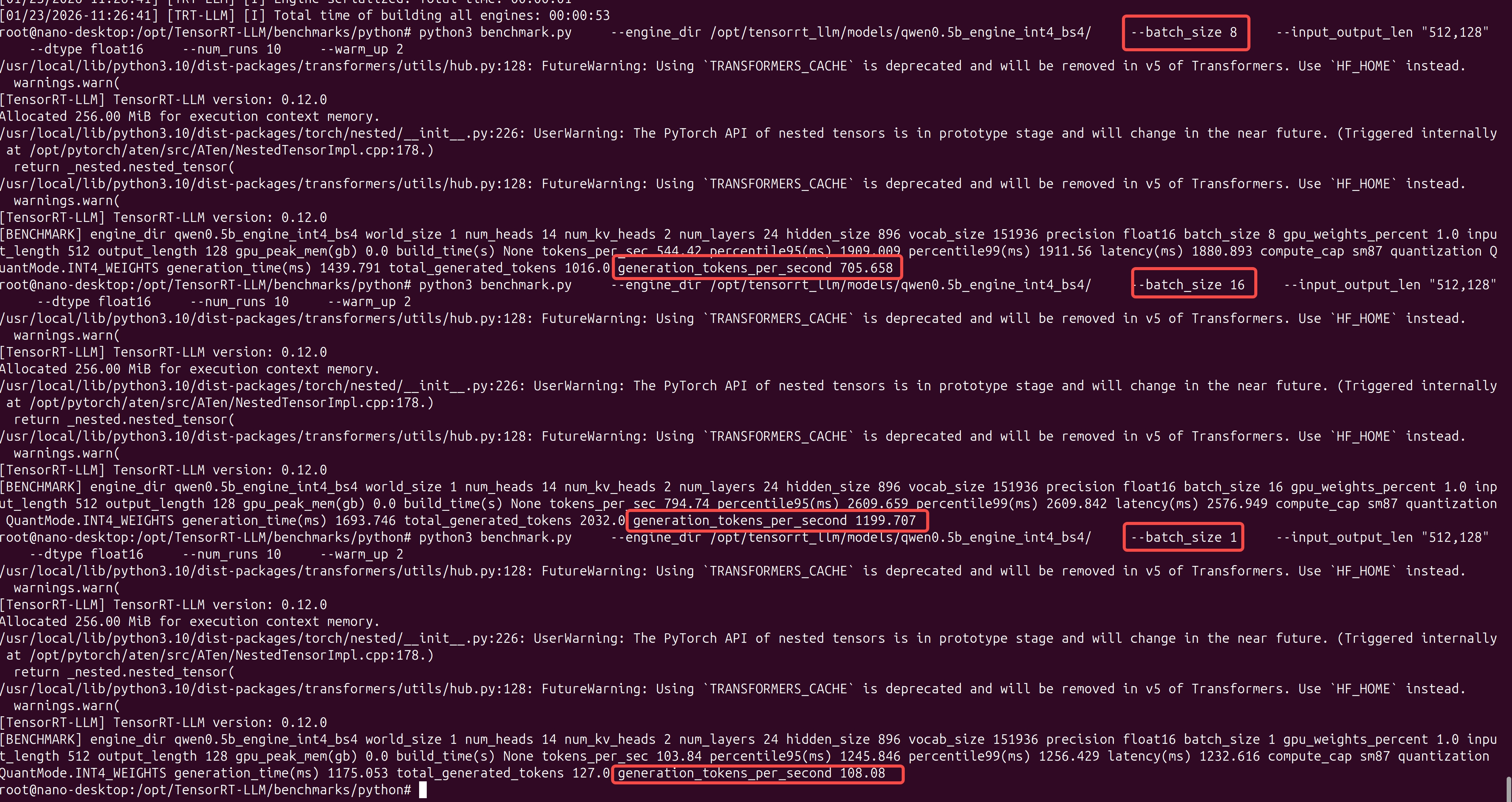
python3 benchmark.py \
    --engine_dir /opt/tensorrt_llm/models/qwen0.5b_engine_int4_bs4/ \
    --batch_size 4 \
    --input_output_len "512,128" \
    --dtype float16 \
    --num_runs 10 \
    --warm_up 2
- engine_dir:指定 Engine 路径,指向已编译好的 TensorRT-LLM Engine。从路径名 qwen0.5b_engine_int4_bs4 可以推断,这个模型是 Qwen-0.5B,采用了 INT4 量化,且构建时设定的最大 Batch Size 为 4。
- batch_size: 4,推理并发数,本次测试同时处理 4 个请求。这会直接测试芯片在满载(Full Load)状态下的性能。由于你的 Engine 编译时 max_batch_size 可能是 4,所以这里设置 4 是为了榨干该 Engine 的性能。
- input_output_len: “512,128””,输入输出长度,512:输入 Prompt 的长度(影响 PP 阶段)。128:生成 Token 的长度(影响 TG 阶段)。这是一个非常标准的测试组合,模拟了“中等长度提问 + 短回答”的场景。
- dtype: float16,计算精度,即使权重是 INT4 存储,实际矩阵运算(Activation)依然使用 FP16。这能保证在利用 INT4 节省显存的同时,推理精度不崩溃。
- num_runs: 10,循环次数,连续运行 10 次。取平均值可以消除系统波动(如 CPU 调度、瞬时过热降频)带来的误差,使测试结果更具统计学意义。
- warm_up: 2,预热次数,忽略前 2 次的成绩。GPU 在刚开始跑的时候需要进行内存申请、显存对齐等操作,通常第一遍会非常慢。预热可以确保获取的是稳定状态(Steady State)下的真实性能。
qwen2.5-1.5B INT4
启动容器
./jetson-containers/run.sh -v $(pwd)/model_zoo:/opt/tensorrt_llm/models $(autotag tensorrt_llm)
转换模型
使用TensorRT-LLM提供的工具进行量化,如果内存不够就到PC上去做量化,见下。
cd /opt/TensorRT-LLM/examples/qwen

python3 convert_checkpoint.py \
    --model_dir /opt/tensorrt_llm/models/Qwen2.5-1.5B-Instruct/ \
    --output_dir /opt/tensorrt_llm/models/qwen1.5b_ckpt_int4/ \
    --dtype float16 \
    --use_weight_only \
    --weight_only_precision int4
构建引擎
构建引擎
trtllm-build \
    --checkpoint_dir /opt/tensorrt_llm/models/qwen3b_ckpt_int4 \
    --output_dir /opt/tensorrt_llm/models/qwen3b_int4_bs1_engine \
    --gemm_plugin float16 \
    --gpt_attention_plugin float16 \
    --max_batch_size 1 \
    --max_input_len 1024 \
    --max_seq_len 1024 \
    --workers 1
如果内存不够的话就把max_batch_size改小一点。
测试对话
python3 ../run.py \
    --engine_dir /opt/tensorrt_llm/models/qwen1.5b_int4_bs1_engine/ \
    --tokenizer_dir /opt/tensorrt_llm/models/Qwen2.5-3B-Instruct/ \
    --max_output_len 128 \
    --input_text "你好,请介绍一下你自己,并讲一个关于芯片工程师的冷笑话。"
测试性能
压力测试
cd /opt/TensorRT-LLM/benchmarks/python

# 运行 Batch Size 1 的测试
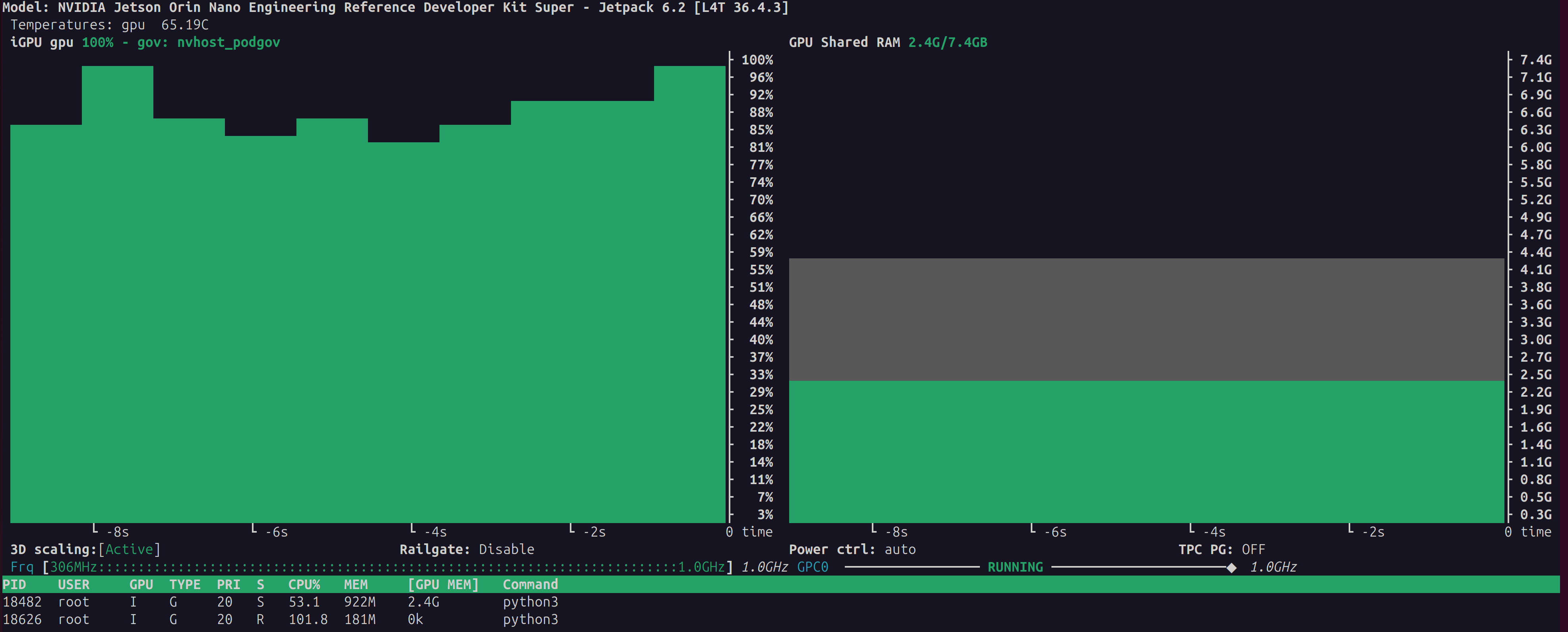
python3 benchmark.py \
    --engine_dir /opt/tensorrt_llm/models/qwen1.5b_engine_int4_bs4/ \
    --batch_size 1 \
    --input_output_len "128,128" \
    --dtype float16 \
    --num_runs 10 \
    --warm_up 2


qwen2.5-3B INT4
启动容器
./jetson-containers/run.sh -v $(pwd)/model_zoo:/opt/tensorrt_llm/models $(autotag tensorrt_llm)
转换模型
使用TensorRT-LLM提供的工具进行量化,如果内存不够就到PC上去做量化,见下。
python3 convert_checkpoint.py   \
    --model_dir /data/Qwen2.5-3B-Instruct/    \
    --output_dir /data/qwen3b_ckpt_int4    \
    --dtype float16    \
    --use_weight_only    \
    --weight_only_precision int4
构建引擎
构建引擎
base) nano@nano-desktop:~$ docker run --runtime nvidia -it --rm \
    --network host \
    --shm-size=8g \
    --volume /home/nano/model_zoo:/opt/tensorrt_llm/models \
    --workdir /opt/tensorrt_llm/examples/qwen \
    dustynv/tensorrt_llm:0.12-r36.4.0 \
    /bin/bash -c "export TRT_MAX_WORKSPACE_SIZE=1073741824 && \
                  trtllm-build \
                  --checkpoint_dir /opt/tensorrt_llm/models/qwen3b_ckpt_int4 \
                  --output_dir /opt/tensorrt_llm/models/qwen3b_int4_bs1_engine \
                  --gemm_plugin float16 \
                  --gpt_attention_plugin float16 \
                  --max_batch_size 1 \
                  --max_seq_len 1024 \
                  --workers 1 \
                  --builder_opt 1"
/usr/local/lib/python3.10/dist-packages/transformers/utils/hub.py:128: FutureWarning: Using `TRANSFORMERS_CACHE` is deprecated and will be removed in v5 of Transformers. Use `HF_HOME` instead.
  warnings.warn(
[TensorRT-LLM] TensorRT-LLM version: 0.12.0
[01/24/2026-04:10:02] [TRT-LLM] [I] Set bert_attention_plugin to auto.
[01/24/2026-04:10:02] [TRT-LLM] [I] Set gpt_attention_plugin to float16.
[01/24/2026-04:10:02] [TRT-LLM] [I] Set gemm_plugin to float16.
[01/24/2026-04:10:02] [TRT-LLM] [I] Set gemm_swiglu_plugin to None.
[01/24/2026-04:10:02] [TRT-LLM] [I] Set fp8_rowwise_gemm_plugin to None.
[01/24/2026-04:10:02] [TRT-LLM] [I] Set nccl_plugin to auto.
[01/24/2026-04:10:02] [TRT-LLM] [I] Set lookup_plugin to None.
[01/24/2026-04:10:02] [TRT-LLM] [I] Set lora_plugin to None.
[01/24/2026-04:10:02] [TRT-LLM] [I] Set moe_plugin to auto.
[01/24/2026-04:10:02] [TRT-LLM] [I] Set mamba_conv1d_plugin to auto.
[01/24/2026-04:10:02] [TRT-LLM] [I] Set context_fmha to True.
[01/24/2026-04:10:02] [TRT-LLM] [I] Set bert_context_fmha_fp32_acc to False.
[01/24/2026-04:10:02] [TRT-LLM] [I] Set paged_kv_cache to True.
[01/24/2026-04:10:02] [TRT-LLM] [I] Set remove_input_padding to True.
[01/24/2026-04:10:02] [TRT-LLM] [I] Set reduce_fusion to False.
[01/24/2026-04:10:02] [TRT-LLM] [I] Set enable_xqa to True.
[01/24/2026-04:10:02] [TRT-LLM] [I] Set tokens_per_block to 64.
[01/24/2026-04:10:02] [TRT-LLM] [I] Set use_paged_context_fmha to False.
[01/24/2026-04:10:02] [TRT-LLM] [I] Set use_fp8_context_fmha to False.
[01/24/2026-04:10:02] [TRT-LLM] [I] Set multiple_profiles to False.
[01/24/2026-04:10:02] [TRT-LLM] [I] Set paged_state to True.
[01/24/2026-04:10:02] [TRT-LLM] [I] Set streamingllm to False.
[01/24/2026-04:10:02] [TRT-LLM] [W] Implicitly setting QWenConfig.qwen_type = qwen2
[01/24/2026-04:10:02] [TRT-LLM] [W] Implicitly setting QWenConfig.moe_intermediate_size = 0
[01/24/2026-04:10:02] [TRT-LLM] [W] Implicitly setting QWenConfig.moe_shared_expert_intermediate_size = 0
[01/24/2026-04:10:02] [TRT-LLM] [I] Set dtype to float16.
[01/24/2026-04:10:02] [TRT-LLM] [W] remove_input_padding is enabled, while opt_num_tokens is not set, setting to max_batch_size*max_beam_width.

[01/24/2026-04:10:02] [TRT-LLM] [W] max_num_tokens (1024) shouldn't be greater than max_seq_len * max_batch_size (1024), specifying to max_seq_len * max_batch_size (1024).
[01/24/2026-04:10:02] [TRT-LLM] [W] padding removal and fMHA are both enabled, max_input_len is not required and will be ignored
[01/24/2026-04:10:02] [TRT] [I] [MemUsageChange] Init CUDA: CPU +12, GPU +0, now: CPU 164, GPU 1447 (MiB)
[01/24/2026-04:10:05] [TRT] [I] [MemUsageChange] Init builder kernel library: CPU +947, GPU +1133, now: CPU 1154, GPU 2594 (MiB)
[01/24/2026-04:10:05] [TRT] [W] profileSharing0806 is on by default in TensorRT 10.0. This flag is deprecated and has no effect.
[01/24/2026-04:10:05] [TRT-LLM] [I] Set weight_only_quant_matmul_plugin to float16.
[01/24/2026-04:10:05] [TRT-LLM] [I] Set nccl_plugin to None.
[01/24/2026-04:10:06] [TRT-LLM] [I] Total optimization profiles added: 1
[01/24/2026-04:10:06] [TRT-LLM] [I] Build TensorRT engine Unnamed Network 0
[01/24/2026-04:10:06] [TRT] [W] DLA requests all profiles have same min, max, and opt value. All dla layers are falling back to GPU
[01/24/2026-04:10:06] [TRT] [W] Unused Input: position_ids
[01/24/2026-04:10:06] [TRT] [W] [RemoveDeadLayers] Input Tensor position_ids is unused or used only at compile-time, but is not being removed.
[01/24/2026-04:10:06] [TRT] [I] Global timing cache in use. Profiling results in this builder pass will be stored.
[01/24/2026-04:10:06] [TRT] [I] Compiler backend is used during engine build.
[01/24/2026-04:10:11] [TRT] [I] [GraphReduction] The approximate region cut reduction algorithm is called.
[01/24/2026-04:10:11] [TRT] [I] Detected 15 inputs and 1 output network tensors.
NvMapMemAllocInternalTagged: 1075072515 error 12
NvMapMemHandleAlloc: error 0
NvMapMemAllocInternalTagged: 1075072515 error 12
NvMapMemHandleAlloc: error 0
[01/24/2026-04:10:20] [TRT] [E] [resizingAllocator.cpp::allocate::74] Error Code 1: Cuda Runtime (out of memory)
[01/24/2026-04:10:20] [TRT] [W] Requested amount of GPU memory (1514557910 bytes) could not be allocated. There may not be enough free memory for allocation to succeed.
[01/24/2026-04:10:20] [TRT] [E] [globWriter.cpp::makeResizableGpuMemory::433] Error Code 2: OutOfMemory (Requested size was 1514557910 bytes.)
Traceback (most recent call last):
  File "/usr/local/bin/trtllm-build", line 8, in <module>
    sys.exit(main())
  File "/usr/local/lib/python3.10/dist-packages/tensorrt_llm/commands/build.py", line 500, in main
    parallel_build(model_config, ckpt_dir, build_config, args.output_dir,
  File "/usr/local/lib/python3.10/dist-packages/tensorrt_llm/commands/build.py", line 377, in parallel_build
    passed = build_and_save(rank, rank % workers, ckpt_dir,
  File "/usr/local/lib/python3.10/dist-packages/tensorrt_llm/commands/build.py", line 344, in build_and_save
    engine = build_model(build_config,
  File "/usr/local/lib/python3.10/dist-packages/tensorrt_llm/commands/build.py", line 337, in build_model
    return build(model, build_config)
  File "/usr/local/lib/python3.10/dist-packages/tensorrt_llm/builder.py", line 1060, in build
    engine = None if build_config.dry_run else builder.build_engine(
  File "/usr/local/lib/python3.10/dist-packages/tensorrt_llm/_common.py", line 204, in decorated
    return f(*args, **kwargs)
  File "/usr/local/lib/python3.10/dist-packages/tensorrt_llm/builder.py", line 411, in build_engine
    assert engine is not None, 'Engine building failed, please check the error log.'
AssertionError: Engine building failed, please check the error log.
内存不够,测不了了……
DeepSeek R1-1.5B
启动容器
./jetson-containers/run.sh -v $(pwd)/model_zoo:/opt/tensorrt_llm/models $(autotag tensorrt_llm)
转换模型
使用TensorRT-LLM提供的工具进行量化,如果内存不够就到PC上去做量化,见下。
cd /opt/TensorRT-LLM/examples/qwen

python3 convert_checkpoint.py \
    --model_dir /data/DeepSeek-R1-Distill-Qwen-1.5B/ \
    --output_dir /data/deepseek_r1_1.5b_ckpt_int4 \
    --dtype float16 \
    --use_weight_only \
    --weight_only_precision int4
构建引擎
构建引擎
trtllm-build \
    --checkpoint_dir /opt/tensorrt_llm/models/deepseek_r1_1.5b_ckpt_int4 \
    --output_dir /opt/tensorrt_llm/models/deepseek_r1_1.5b_int4_bs1_engine \
    --gemm_plugin float16 \
    --gpt_attention_plugin float16 \
    --max_batch_size 1 \
    --max_input_len 1024 \
    --max_seq_len 1024 \
    --workers 1
如果内存不够的话就把max_batch_size改小一点。
测试对话
cd /opt/TensorRT-LLM/examples/qwen
python3 ../run.py \
    --engine_dir /opt/tensorrt_llm/models/deepseek_r1_1.5b_int4_bs1_engine/ \
    --tokenizer_dir /opt/tensorrt_llm/models/DeepSeek-R1-Distill-Qwen-1.5B/ \
    --max_output_len 128 \
    --input_text "你好,请介绍一下你自己,并讲一个关于芯片工程师的冷笑话。"
测试性能
压力测试
cd /opt/TensorRT-LLM/benchmarks/python

# 运行 Batch Size 1 的测试
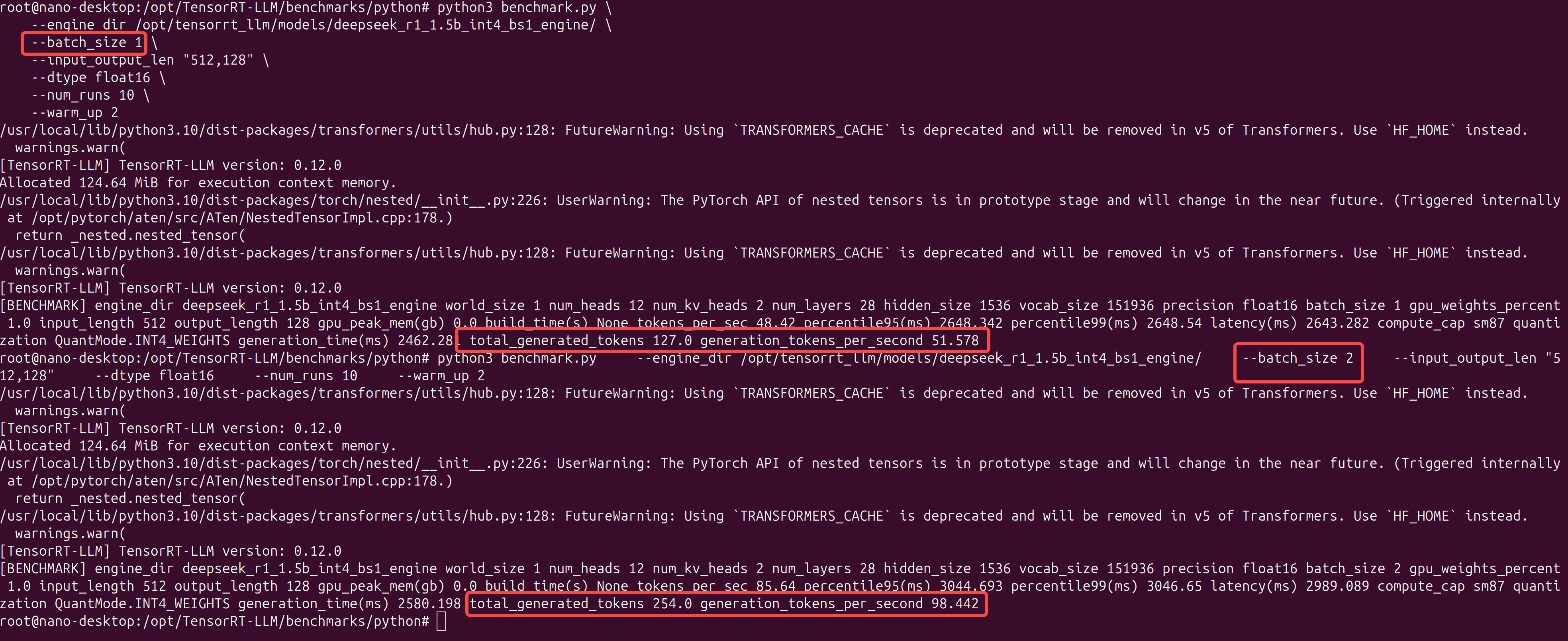
python3 benchmark.py \
    --engine_dir /opt/tensorrt_llm/models/deepseek_r1_1.5b_int4_bs1_engine/ \
    --batch_size 1 \
    --input_output_len "512,128" \
    --dtype float16 \
    --num_runs 10 \
    --warm_up 2
在PC上做量化
由于在jetson nano上做量化,内存不足,可以考虑在PC上做量化,然后把模型拷贝到设备中去。由于容器内使用的python是3.12,所以我们安装一个PyTorch 24.02的容器。
安装量化环境
(1)启动容器
# 注意:镜像换成了 pytorch:24.02-py3,它是 Python 3.10 环境
docker run --rm -it --ipc=host --gpus all \
    -v ~/model_zoo:/data \
    -v ~/TensorRT-LLM:/code \
    -w /code/examples/qwen \
    nvcr.io/nvidia/pytorch:24.02-py3 bash
(2)安装TensorRT-LLM 0.12.0
# 这一步会下载约 1GB 的包,请耐心等待
pip install tensorrt_llm==0.12.0 --extra-index-url https://pypi.nvidia.com
(3)安装脚本依赖
pip install "transformers==4.38.2" safetensors accelerate
(4)验证安装
python3 -c "import tensorrt_llm; print(tensorrt_llm.__version__)"
# 输出应该是 0.12.0
过程中如果遇到问题,可以按照下面的办法处理
# 强制重装 TensorRT 相关的核心包
pip install --force-reinstall \
    tensorrt==10.3.0 \
    tensorrt-cu12==10.3.0 \
    tensorrt-cu12-bindings==10.3.0 \
    tensorrt-cu12-libs==10.3.0

export LD_LIBRARY_PATH=$LD_LIBRARY_PATH:/usr/local/lib/python3.10/dist-packages/tensorrt_libs

#卸载捣乱的 Flash Attention,不需要这个
pip uninstall -y flash-attn

# 1. 卸载可能存在的冲突包
pip uninstall -y pynvml nvidia-ml-py

# 2. 安装旧版 pynvml (11.4.1 是最稳定的旧版,完美兼容 0.12.0)
pip install pynvml==11.4.1
转换模型
python3 convert_checkpoint.py \
    --model_dir /data/Qwen2.5-1.5B-Instruct/ \
    --output_dir /data/qwen1.5b_ckpt_int4 \
    --dtype float16 \
    --use_weight_only \
    --weight_only_precision int4
然后可以拷贝到设备上。
# 确保 Jetson 上有这个目录
ssh nano@10.0.91.125 "mkdir -p ~/model_zoo"

# 开始传输 (PC -> Jetson)
rsync -avP ~/model_zoo/qwen1.5b_ckpt_int4 nano@10.0.91.125:~/model_zoo/
常见问题
找不到库
如果在模型转换的时候出现下面报错,先退出docker容器,安装下面的库
ImportError: libnvdla_compiler.so: cannot open shared object file: No such file or directory
wget -O - https://repo.download.nvidia.com/jetson/common/pool/main/n/nvidia-l4t-dla-compiler/nvidia-l4t-dla-compiler_36.4.1-20241119120551_arm64.deb | dpkg-deb --fsys-tarfile - | sudo tar xv --strip-components=5 --directory=/usr/lib/aarch64-linux-gnu/nvidia/ ./usr/lib/aarch64-linux-gnu/nvidia/libnvdla_compiler.so
内存不足
禁用桌面图像界面,暂时禁用
$ sudo init 3     # stop the desktop
# log your user back into the console (Ctrl+Alt+F1, F2, ect)
$ sudo init 5     # restart the desktop
如果想重启也禁用
#禁用
sudo systemctl set-default multi-user.target

#启用
sudo systemctl set-default graphical.target
# 强行同步并释放缓存
sudo sh -c 'sync; echo 3 > /proc/sys/vm/drop_caches'
参考资料: