llama.cpp初探:simple示例代码简要分析
加载后端
void ggml_backend_load_all() {
    ggml_backend_load_all_from_path(nullptr);
}

void ggml_backend_load_all_from_path(const char * dir_path) {
#ifdef NDEBUG
    bool silent = true;
#else
    bool silent = false;
#endif

    ggml_backend_load_best("blas", silent, dir_path);
    ggml_backend_load_best("zendnn", silent, dir_path);
    ggml_backend_load_best("cann", silent, dir_path);
    ggml_backend_load_best("cuda", silent, dir_path);
    ggml_backend_load_best("hip", silent, dir_path);
    ggml_backend_load_best("metal", silent, dir_path);
    ggml_backend_load_best("rpc", silent, dir_path);
    ggml_backend_load_best("sycl", silent, dir_path);
    ggml_backend_load_best("vulkan", silent, dir_path);
    ggml_backend_load_best("opencl", silent, dir_path);
    ggml_backend_load_best("hexagon", silent, dir_path);
    ggml_backend_load_best("musa", silent, dir_path);
    ggml_backend_load_best("cpu", silent, dir_path);
    // check the environment variable GGML_BACKEND_PATH to load an out-of-tree backend
    const char * backend_path = std::getenv("GGML_BACKEND_PATH");
    if (backend_path) {
        ggml_backend_load(backend_path);
    }
}
动态加载所有可用的计算后端(CPU、CUDA、Metal 等),让 llama.cpp 能在不同硬件上运行。通过评分机制选择最适合的后端进行注册。每个后端会提供一个获取评分的函数,使用该函数进行计算得到分值,比如使用位运算累加看看性能。注册后端注释是加载其对应后端的动态库,将后端添加到backends向量。
加载模型
先看看看GGUF的模型文件。
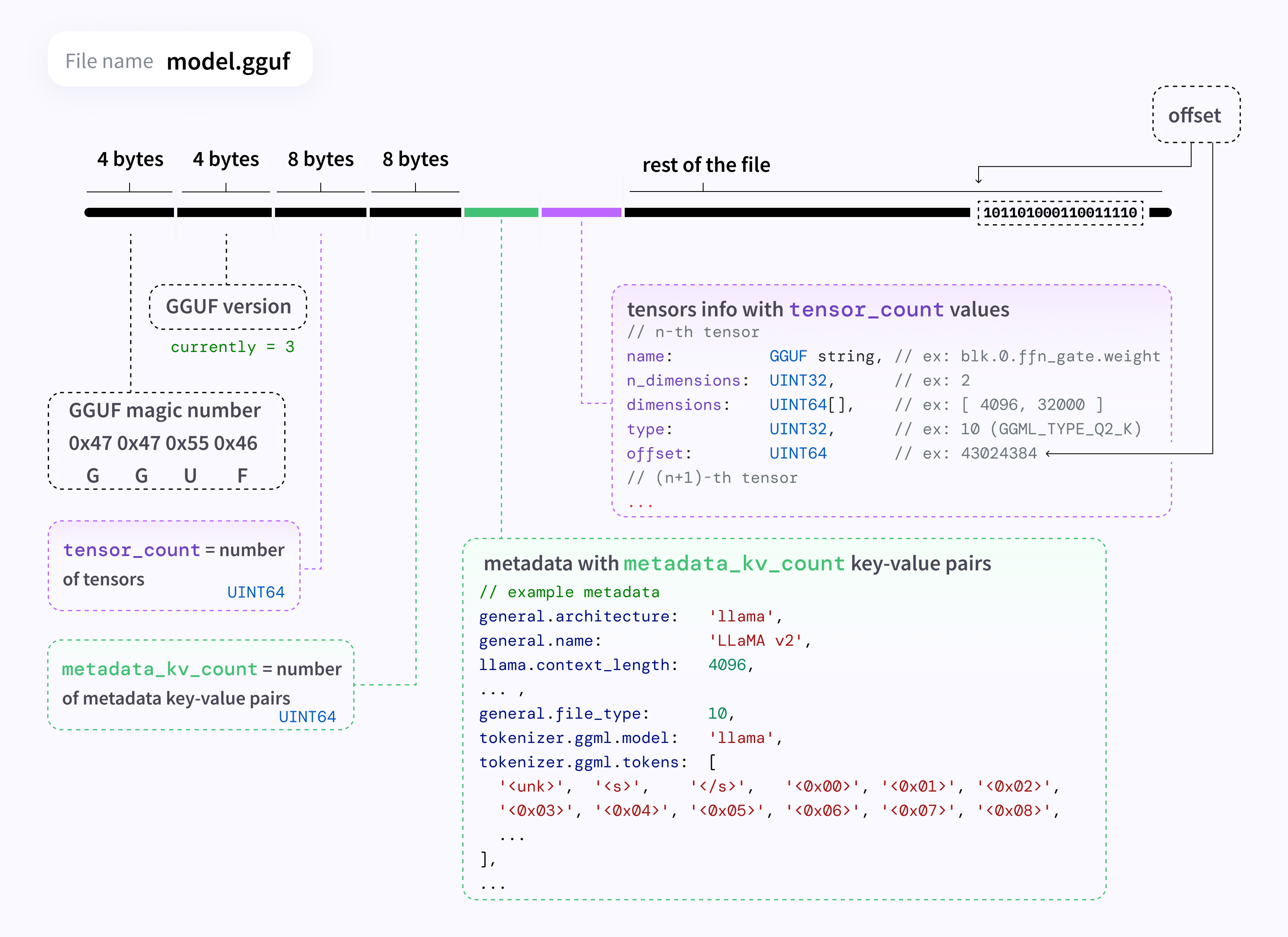
(1)文件头: 位于文件的最开始位置,用于快速校验文件是否合法。
- Magic Number (4 bytes): 0x47 0x47 0x55 0x46,对应的 ASCII 码就是 “GGUF”。加载器首先读取这4个字节,如果不对,直接报错。
- Version (4 bytes): 版本号(图中是 3)。这允许加载器处理不同版本的格式变化(向后兼容)。
- Tensor Count (8 bytes, UINT64): 模型中包含的张量(权重矩阵)总数。比如一个 7B 模型可能有几百个 Tensor。
- Metadata KV Count (8 bytes, UINT64): 元数据键值对的数量。这是 GGUF 最核心的改进点。
(2)元数据键值对:接在头部之后,这部分定义了模型的所有非权重信息
以前的格式(如 GGML)通常把超参数(层数、维度等)写死在代码或特定的结构体里。GGUF 改用 Key-Value 映射。
- 架构信息: general.architecture = “llama”(告诉加载器用哪套逻辑加载)。
- 模型参数: llama.context_length = 4096, llama.embedding_length = 4096 等。
- Tokenizer (词表): 这一点非常重要。GGUF 将词表(tokenizer.ggml.tokens)直接打包在文件里,不再需要额外的 tokenizer.json 或 vocab.model 文件。这实现了真正的“单文件发布”。
- 其他: 作者信息、量化方法描述等。
(3)张量信息表:索引目录
在读取完所有元数据后,就是 Tensor 的索引列表。这里不包含实际的权重数据,只是数据的“描述”和“指针”。对于每一个 Tensor(共 tensor_count 个),包含以下字段:
- Name: 字符串,例如 blk.0.ffn_gate.weight。这对应了模型层中的具体权重名称。
- n_dimensions: 维度数量(例如 2 表示矩阵,1 表示向量)。
- dimensions: 具体的形状数组,例如 [4096, 32000]。
- Type: 数据类型,例如 GGML_TYPE_Q2_K(2-bit 量化)、F16 等。
- Offset (8 bytes, UINT64): 这是最关键的字段。它是一个指针(偏移量),告诉程序:“这个张量的实际二进制数据,位于文件数据区的第 X 个字节处”。
(4)数据区:图中右侧箭头指向的 10110… 部分。
这是文件体积最大的部分,包含所有权重矩阵的实际二进制数据。内存映射 (mmap) 的奥秘,因为有了上面的 Offset,llama_model_load_from_file 不需要把整个几 GB 的文件一次性读入 RAM。 它只需要调用系统级 API mmap,将文件映射到虚拟内存。当模型推理需要用到 blk.0 的权重时,CPU/GPU 根据 Offset 直接去磁盘(或文件系统缓存)里拿数据。这就是为什么 GGUF 模型启动速度极快且内存占用低的原因。
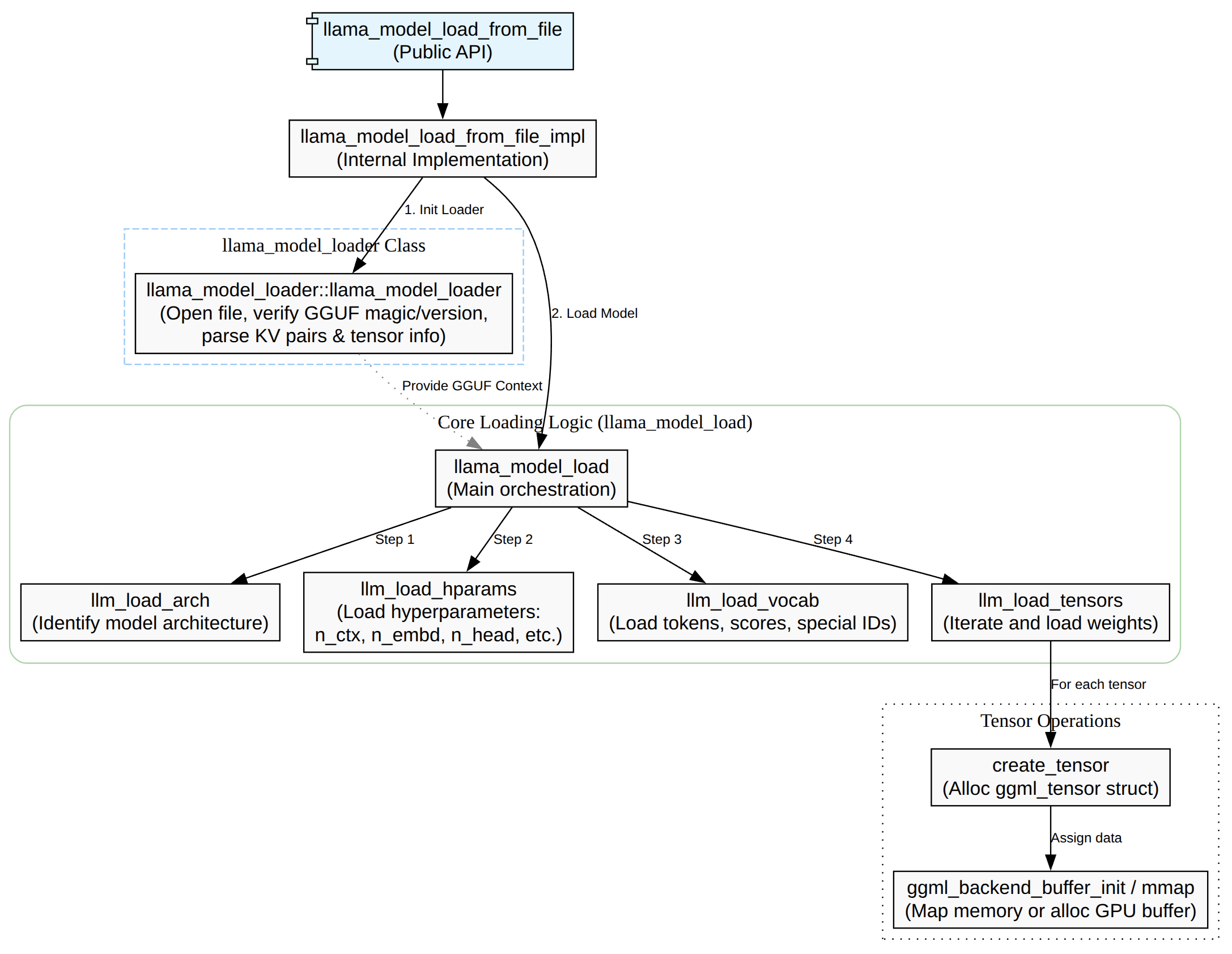
模型加载主要是将GGUF加载进来,主要的流程是先检查是否有注册后端,然后选择对应的设备,接着解析GGUF元信息包括KV/张量表,接着按照n_gpu_layers/tensor_split分配层与buffer,再者就是读取/映射/上传权重数据,返回llama_model对象指针。
其中最核心的函数就是llama_mode_load,这个函数主要的作用如下:
- load_arch:先知道是什么架构,后面的 KV key 解释/张量命名规则才对。
- load_hparams:读 GGUF KV 填充超参。
- load_vocab:构建 tokenizer/vocab。
- load_tensors:决定设备/缓冲区并实际装载权重数据。
load_arch
load_arch加载的是模型的架构类型,比如LLaMA、Falcon、Qwen、CLIP等大类,存储到llama_mode::arch字段里面,这个来源是GGUF的metadata key。
    get_key(llm_kv(LLM_KV_GENERAL_ARCHITECTURE), arch_name, false);
    llm_kv = LLM_KV(llm_arch_from_string(arch_name));
load_arch本身只是把loader里解析好的枚举出来。
void llama_model::load_arch(llama_model_loader & ml) {
    arch = ml.get_arch();
    if (arch == LLM_ARCH_UNKNOWN) {
        throw std::runtime_error("unknown model architecture: '" + ml.get_arch_name() + "'");
    }
}
之所以要解析加载arch是因为后面所以得操作都依赖着arch,比如怎么解释GGUF、怎么建张量的逻辑依赖arch。l
- oad_hparams 需要 arch 才知道该读哪些 KV、如何解释超参,而且它还用 arch 做特殊分支(例如 CLIP 直接跳过 hparams)。
- load_vocab 会用 arch 构造 LLM_KV(arch),影响 vocab/tokenizer 的加载规则。
- load_tensors 更是直接 switch (arch) 来决定要创建哪些权重张量、张量命名/shape/op 映射等。
load_hparams
struct llama_hparams {
    bool vocab_only;
    bool no_alloc;
    bool rope_finetuned;
    bool use_par_res;
    bool swin_norm;

    uint32_t n_ctx_train; // context size the model was trained on
    uint32_t n_embd;
    uint32_t n_embd_features = 0;
    uint32_t n_layer;
    // ...
    uint32_t n_rot;
    uint32_t n_embd_head_k;
    uint32_t n_embd_head_v;
    uint32_t n_expert = 0;
    uint32_t n_expert_used = 0;
    // ...
};
这里的 hparams 指的是 llama_model 里的 模型超参数/结构参数(hyper-parameters):决定模型“长什么样”(层数、隐藏维度、头数、RoPE/ALiBi/SWA/MoE 等配置)。它对应的结构体是 struct llama_hparams
llama_model::load_hparams(ml) 会从 GGUF 的 KV(metadata)里读取并填充 model.hparams(以及一些辅助状态,比如 gguf_kv 字符串表、type 等)
- 模型结构: 训练时的context长度、embedding/hidden size、transformer block 数、MoE等。
- 注意力/FFN:支持 KV 是标量或数组:有些模型每层不同。
- RoPE相关:rope_finetuned / rope_freq_base_train / rope_freq_scale_train / rope_scaling_type_train / n_rot / n_embd_head_k/v 等
- 架构特化项:比如 LLM_ARCH_WAVTOKENIZER_DEC 会额外读 posnet/convnext 参数。
load_vocab
load_vocab 加载的是 模型的词表/分词器(tokenizer + vocab):包括每个 token 的文本、score、属性(normal/control/user_defined/unknown/byte 等),以及各种 special token(BOS/EOS/EOT/PAD/…)和不同 tokenizer(SPM/BPE/WPM/UGM/RWKV/…)所需的附加数据(如 BPE merges、charsmap 等)。
struct llama_vocab {
    struct token_data {
        std::string      text;
        float            score;
        llama_token_attr attr;
    };

    void load(llama_model_loader & ml, const LLM_KV & kv);

    std::string get_tokenizer_model() const;
    std::string get_tokenizer_pre() const;

    enum llama_vocab_type     get_type()     const;
    enum llama_vocab_pre_type get_pre_type() const;

    uint32_t n_tokens() const;
    uint32_t n_token_types() const;
    // ...
};
模型的推理需要做文本到token id的双向转换,输入的prompt必须先tokenize 才能喂给llama_decode,输出的token id必须detokenize 才能打印成字符串。不同模型(LLaMA / Falcon / ChatGLM / …)的 tokenizer 规则不同(SPM/BPE/WPM/UGM…,以及 pre-tokenization 规则),如果 vocab 没加载或加载错,模型就“无法正确理解输入/输出”
load_tensor
这里的tensor是指模型推理所需的所有权重张量(weghts),比如:
- token embedding:tok_embd
- 每层 attention 的 Wq/Wk/Wv/Wo(以及可选 bias、norm 权重等)
- 每层 FFN 的 Wgate/Wup/Wdown(MoE 还会有专家张量、router 等)
- 输出层/输出 embedding(有些模型与 tok_embd 共享,需要 duplicated 处理)
在load tensors会按arch分支创建这些张量,比如已LLAMA类分支片段。
tok_embd = create_tensor(tn(LLM_TENSOR_TOKEN_EMBD, "weight"), {n_embd, n_vocab}, 0);

// output
output_norm = create_tensor(tn(LLM_TENSOR_OUTPUT_NORM, "weight"), {n_embd}, 0);
output      = create_tensor(tn(LLM_TENSOR_OUTPUT,      "weight"), {n_embd, n_vocab}, TENSOR_NOT_REQUIRED);

if (output == NULL) {
    output = create_tensor(tn(LLM_TENSOR_TOKEN_EMBD, "weight"), {n_embd, n_vocab}, TENSOR_DUPLICATED);
}

for (int i = 0; i < n_layer; ++i) {
    auto & layer = layers[i];

    layer.attn_norm = create_tensor(tn(LLM_TENSOR_ATTN_NORM, "weight", i), {n_embd}, 0);

    layer.wq = create_tensor(tn(LLM_TENSOR_ATTN_Q,   "weight", i), {n_embd, n_embd_head_k * n_head}, 0);
    layer.wk = create_tensor(tn(LLM_TENSOR_ATTN_K,   "weight", i), {n_embd, n_embd_k_gqa}, 0);
    layer.wv = create_tensor(tn(LLM_TENSOR_ATTN_V,   "weight", i), {n_embd, n_embd_v_gqa}, 0);
    layer.wo = create_tensor(tn(LLM_TENSOR_ATTN_OUT, "weight", i), {n_embd_head_k * n_head, n_embd}, 0);
}
(1)tensor对象(ggml_tensor *)存在哪里?
- 按语义分组存到 llama_model 的成员里:比如 tok_embd / output_norm / output,以及每层的 layers[i].wq/wk/wv/… 等(这些都是 ggml_tensor * 指针)。
struct llama_model {
    // ...
    struct ggml_tensor * tok_embd   = nullptr;
    // ...
    struct ggml_tensor * output_norm   = nullptr;
    struct ggml_tensor * output        = nullptr;
    // ...
    std::vector<llama_layer> layers;
    // ...
    std::vector<std::pair<std::string, struct ggml_tensor *>> tensors_by_name;
    // ...
};
- 按名字查 tensor:load_tensors() 完成后会把每个 ggml_context 里的 tensor 都放进 tensors_by_name(主要用于内部/统计与 get_tensor(name) 这种按名访问)。
// populate tensors_by_name
for (auto & [ctx, _] : pimpl->ctxs_bufs) {
    for (auto * cur = ggml_get_first_tensor(ctx.get()); cur != NULL; cur = ggml_get_next_tensor(ctx.get(), cur)) {
        tensors_by_name.emplace_back(ggml_get_name(cur), cur);
    }
}
对应按名取
const ggml_tensor * llama_model::get_tensor(const char * name) const {
    auto it = std::find_if(tensors_by_name.begin(), tensors_by_name.end(),
            [name](const std::pair<std::string, ggml_tensor *> & it) { return it.first == name; });
    if (it == tensors_by_name.end()) {
        return nullptr;
    }
    return it->second;
}
(2)tensor数据(权重内容)存在哪里?
ggml_tensor 自身只是一个“描述 + 指针”,真正的权重数据会落在三类地方之一:
- CPU/GPU 后端 buffer 里:load_tensors() 会为不同 buffer type 创建对应的 backend buffer,并把它们与承载 tensor metadata 的 ggml_context 绑在一起。这些 buffer 句柄被保存在:pimpl->ctxs_bufs
struct llama_model::impl {
    // contexts where the model tensors metadata is stored as well as the corresponding buffers:
    std::vector<std::pair<ggml_context_ptr, std::vector<ggml_backend_buffer_ptr>>> ctxs_bufs;
    // ...
};
- mmap 映射区域(文件映射内存):如果启用 mmap,loader 会把模型文件映射进内存,某些 tensor 的 data 会直接指向映射区域,或者后端 buffer 会通过 buffer_from_host_ptr 包装映射内存。映射对象被保存在loader侧:ml.mappings,model侧:pimpl->mappings。
- no_alloc 模式:ml.no_alloc 时只是创建 tensor 元信息与“dummy buffer”,不装载数据,用于某些统计/规划场景。
(3)tensor是怎么分配到那个设备上的?
在GPU上还是CPU上,决策分为两层:
- 层级/设备选择(dev):决定每一层(input/repeating/output)用哪个 ggml_backend_dev_t(CPU / GPU / RPC / IGPU…)。
- buffer type 选择(buft):在选定设备后,再决定该 tensor 用哪个 ggml_backend_buffer_type_t(同一设备也可能有多种 buffer type;并且还会把 CPU buffer type 作为 fallback)。
流程梳理(从“设备列表”到“权重进后端 buffer”)如下:
┌──────────────────────────────────────────────────────────────┐
│ llama_model_load_from_file_impl(path, params)                │
│  - 选择/构建 model->devices (GPU/RPC/IGPU...)                 │
└───────────────┬──────────────────────────────────────────────┘
                │
                v
┌──────────────────────────────────────────────────────────────┐
│ llama_model_load(...)                                        │
│  - llama_model_loader ml(...) 读取 GGUF 元信息、索引 tensors  │
│  - model.load_arch/load_hparams/load_vocab                    │
│  - model.load_tensors(ml)  ← 重点                             │
└───────────────┬──────────────────────────────────────────────┘
                │
                v
┌──────────────────────────────────────────────────────────────┐
│ llama_model::load_tensors(ml)                                │
│  A) 构建候选 buft 列表                                        │
│     cpu_buft_list = make_cpu_buft_list(...)                   │
│     gpu_buft_list[dev] = make_gpu_buft_list(dev,...) + CPU fb │
│                                                              │
│  B) 决定每层放哪台设备(层→dev)                                 │
│     splits = tensor_split 或按 dev free-mem 默认计算           │
│     i_gpu_start = (n_layer+1 - n_gpu_layers)                  │
│     dev_input=CPU, dev_layer[il]=CPU/GPU..., dev_output=...    │
│                                                              │
│  C) 决定每个 tensor 用哪个 buft,并创建 ggml_tensor 元信息       │
│     对每个权重 tensor:                                        │
│       - 根据层(input/repeating/output)选 buft_list             │
│       - buft = select_weight_buft(...) (考虑 op/type/override) │
│       - ctx = ctx_map[buft]  (同 buft 归到同 ggml_context)      │
│       - ml.create_tensor(ctx, ...)  (创建 tensor meta)         │
│     ml.done_getting_tensors() 校验数量                         │
└───────────────┬──────────────────────────────────────────────┘
                │
                v
┌──────────────────────────────────────────────────────────────┐
│  D) 分配后端 buffer(真正“存储权重”的地方)                     │
│     ml.init_mappings(...)  (mmap 时建立映射、算 size_data)      │
│     对每个 (buft -> ctx):                                     │
│       - 若满足条件: ggml_backend_dev_buffer_from_host_ptr(...)  │
│         (把 mmap 的区间包装成后端 buffer,少拷贝)              │
│       - 否则: ggml_backend_alloc_ctx_tensors_from_buft(ctx,buft)│
│       - 结果保存到 model.pimpl->ctxs_bufs 维持生命周期           │
│       - 标记 buffer usage = WEIGHTS (帮助调度)                  │
└───────────────┬──────────────────────────────────────────────┘
                │
                v
┌──────────────────────────────────────────────────────────────┐
│  E) 装载权重数据到后端(mmap/读文件/异步上传)                   │
│     对每个 ctx: ml.load_all_data(ctx, buf_map, progress_cb)    │
│       - progress_cb 返回 false => 取消 => load_tensors 返回 false│
│     若 use_mmap_buffer: model.pimpl->mappings 接管 ml.mappings  │
│     同时填充 model.tensors_by_name 供按名查询/统计              │
└──────────────────────────────────────────────────────────────┘
                │
                v
┌──────────────────────────────────────────────────────────────┐
│ 推理阶段 build_graph / llama_decode                           │
│  - 直接引用 model.tok_embd / model.layers[i].wq... 等 ggml_tensor│
│  - 后端根据 tensor 绑定的 buffer 决定在 CPU/GPU 执行与取数        │
└──────────────────────────────────────────────────────────────┘
buft 是什么?
buft 是 ggml_backend_buffer_type_t(backend buffer type),可以理解为“某个后端设备上,用哪一种内存/分配方式来存放 tensor 数据”的类型句柄。
在 load_tensors() 里它的作用是:给每个权重 tensor 选择一个合适的 buffer type,并据此把 tensor 归到对应的 ggml_context,最终用该 buft 去创建真实的后端 buffer(CPU RAM / GPU VRAM / 远端 RPC buffer / host pinned buffer 等)。
- load_tensors() 里按 tensor 所在层选一个 buft_list,再用 select_weight_buft(…) 选出最终 buft:
if (!buft) {
    buft = select_weight_buft(hparams, t_meta, op, *buft_list);
    if (!buft) {
        throw std::runtime_error(format("failed to find a compatible buffer type for tensor %s", tn.str().c_str()));
    }
}
- 随后用 buft 决定该 tensor 属于哪个 ggml_context(ctx_for_buft(buft)),并最终分配后端 buffer(例如 ggml_backend_alloc_ctx_tensors_from_buft(ctx, buft) 或 mmap 的 ggml_backend_dev_buffer_from_host_ptr(…))。
buft 和 dev(device)的区别
– dev(ggml_backend_dev_t):是哪块设备(CPU / 某张 GPU / RPC 设备…)
– buft(ggml_backend_buffer_type_t):在这块设备上“用哪种 buffer 类型/内存形式”来存 tensor(默认 device buffer、host buffer、特殊优化 buffer 等)
(4)推理阶段如何使用这些权重
后续推理构图时(model.build_graph(…) ——>各 src/models/xx.cpp),会直接用 llama_model 里的这些 ggml_tensor x 作为权重输入,和激活值做 ggml 运算(matmul/add/norm/rope…)。例如 src/models/stablelm.cpp 在构图时直接用:
model.tok_embd 做输入 embedding
– model.layers[il].wq/wk/wv 做 Q/K/V 投影
– model.layers[il].bq/bk/bv(可选)加 bias
– ggml_rope_ext 用 rope 参数对 Q/K 做 RoPE
Tokenization
   const llama_vocab * vocab = llama_model_get_vocab(model);
    // tokenize the prompt

    // find the number of tokens in the prompt
    const int n_prompt = -llama_tokenize(vocab, prompt.c_str(), prompt.size(), NULL, 0, true, true);

    // allocate space for the tokens and tokenize the prompt
    std::vector<llama_token> prompt_tokens(n_prompt);
    if (llama_tokenize(vocab, prompt.c_str(), prompt.size(), prompt_tokens.data(), prompt_tokens.size(), true, true) < 0) {
        fprintf(stderr, "%s: error: failed to tokenize the prompt\n", __func__);
        return 1;
    }
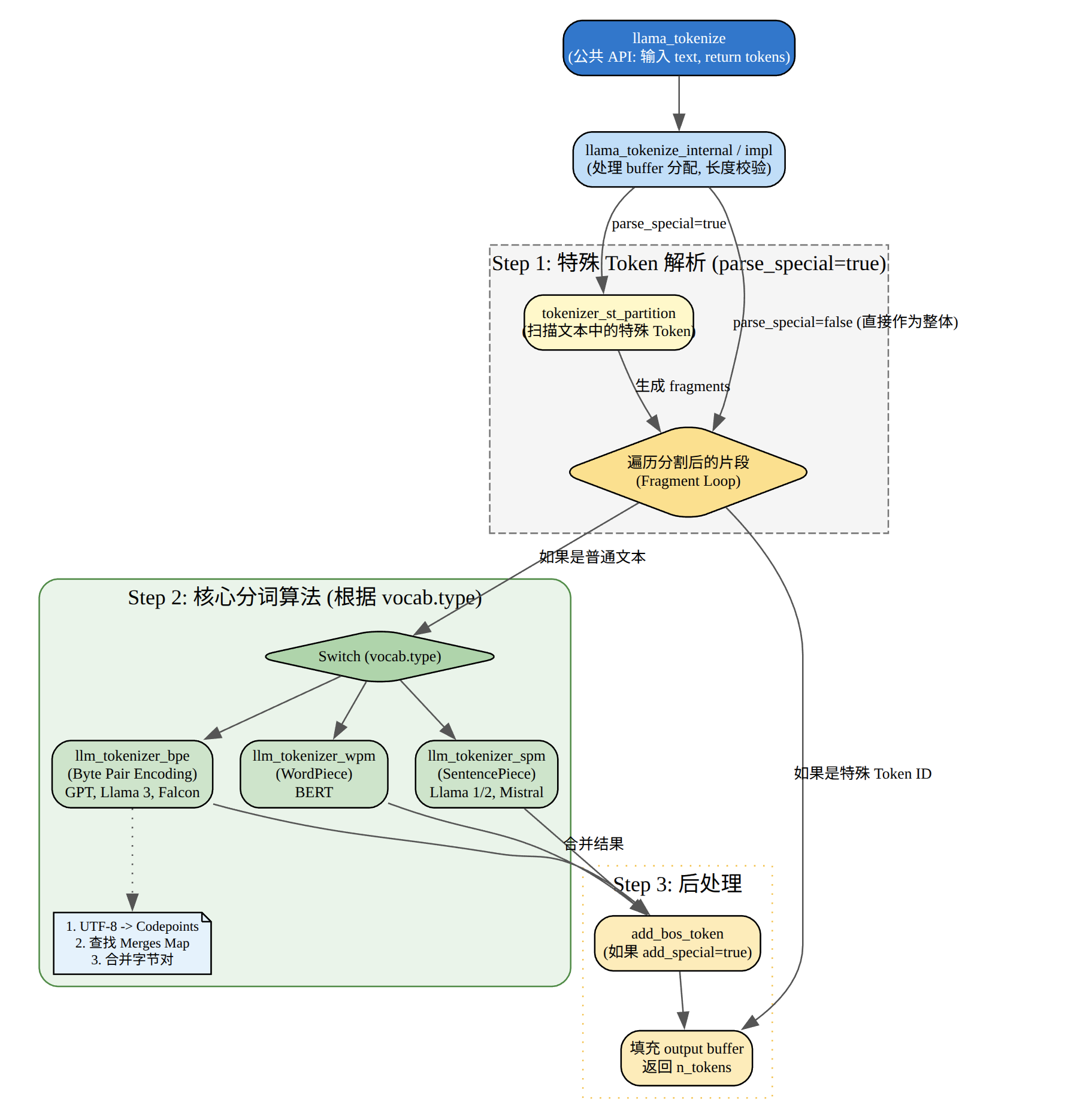
这段代码主要的作用是做文本->token ID的转换。整段的流程可以总结一下。
- 拿vocab:llama_model_get_vocab(model) 获取 tokenizer/词表句柄;
- 预估token数:第一次 llama_tokenize(…, NULL, 0, …),只算需要多少 token,返回负数取反得到 n_prompt;
- 分配缓存:std::vector
prompt_tokens(n_prompt); 为 prompt 分配精确长度的 token 缓冲区; - 真正 tokenize:第二次 llama_tokenize 把 token id 写进 prompt_tokens,如果失败或容量不够返回 < 0 则报错退出。
llama_tokenize() tokenize 的对象是 一段输入文本(UTF-8 字符串),输出是 token id 序列(llama_token):也就是模型能直接消费的离散符号编号。它依赖 llama_vocab(模型绑定的 tokenizer + 词表 + special token 规则),把文本切分/编码成 token ids。
llama_tokenize会转发到vocab->tokenize,先做 special token 分段,再按 vocab type 分发到具体 tokenizer session。
std::vector<llama_token> llama_vocab::impl::tokenize(const std::string & raw_text, bool add_special, bool parse_special) const {
    // 1) special token partition(把 raw_text 切成「普通文本片段」和「已识别的特殊 token」)
    tokenizer_st_partition(fragment_buffer, parse_special);

    // 2) 按 vocab type 分发到具体 tokenizer session
    switch (get_type()) {
        case LLAMA_VOCAB_TYPE_SPM:  llm_tokenizer_spm_session(...).tokenize(...); break;
        case LLAMA_VOCAB_TYPE_BPE:  llm_tokenizer_bpe_session(...).tokenize(...); break;
        case LLAMA_VOCAB_TYPE_WPM:  llm_tokenizer_wpm_session(...).tokenize(...); break;
        case LLAMA_VOCAB_TYPE_UGM:  llm_tokenizer_ugm_session(...).tokenize(...); break;
        case LLAMA_VOCAB_TYPE_RWKV: llm_tokenizer_rwkv_session(...).tokenize(...); break;
        case LLAMA_VOCAB_TYPE_PLAMO2: llm_tokenizer_plamo2_session(...).tokenize(...); break;
        default: GGML_ABORT(...);
    }
    return output;
}
SPM
SentencePiece BPE-ish 合并,项目里叫 SPM tokenizer,入口类是llm_tokenizer_spm_session,其核心思路是把文本先按 UTF-8 字符拆成链表 symbol,然后不断从优先队列取“得分最高”的可合并 bigram,做合并,最后把每个合并后的片段映射为 token。
struct llm_tokenizer_spm_session {
  void tokenize(const std::string & text, std::vector<llama_token> & output) {
    // split into utf8 chars -> symbols
    // seed work_queue with all 2-char tokens -> try_add_bigram
    // pop highest score, merge, and push new bigrams
    // resegment each final symbol into token ids / byte tokens
  }
}
在 impl::tokenize 的 SPM 分支里,会先把空格转义成 “▁”(U+2581),并处理 add_space_prefix、BOS/EOS:
if (add_space_prefix && is_prev_special) { text = ' '; }
text += fragment...
llama_escape_whitespace(text);              // ' ' -> ▁
llm_tokenizer_spm_session session(vocab);
session.tokenize(text, output);
BEP
Byte Pair Encoding,入口类:llm_tokenizer_bpe_session,其核心思路是
- 1) 用“pre-tokenizer regex”(不同模型 pre_type 不同)把文本切成词片段(word_collection)。
- 2) 每个词片段再按 UTF-8 拆成 symbols。
- 3) 用 vocab.find_bpe_rank(left,right) 查 merges rank(越小越优先),不断合并。
- 4) 合并结束后把每个最终 symbol 映射为 token(找不到就回退到逐字节 token)。
WPM
WordPiece,入口类:llm_tokenizer_wpm_session,核心思路是:
- 先做 NFD 归一化 + 按 whitespace/标点切词(preprocess)
- 每个词前加 “▁”
- 对每个词做 最长匹配(从当前位置往后尽量取最长、且在 vocab 中存在的 token)
- 若某个词无法完全分解,回退整个词为unk
UGM
入口类:llm_tokenizer_ugm_session,核心思路:典型 unigram LM 的 Viterbi 最优切分:
- 先 normalize 输入
- 每个位置沿 trie 找所有可能 token,做动态规划选择 “累计得分最大”的路径
- 走不通就用 unknown token + penalty
- 最后从末尾回溯得到 token 序列
初始化上下文
    llama_context_params ctx_params = llama_context_default_params();
    // n_ctx is the context size
    ctx_params.n_ctx = n_prompt + n_predict - 1;
    // n_batch is the maximum number of tokens that can be processed in a single call to llama_decode
    ctx_params.n_batch = n_prompt;
    // enable performance counters
    ctx_params.no_perf = false;

    llama_context * ctx = llama_init_from_model(model, ctx_params);

    if (ctx == NULL) {
        fprintf(stderr , "%s: error: failed to create the llama_context\n" , __func__);
        return 1;
    }
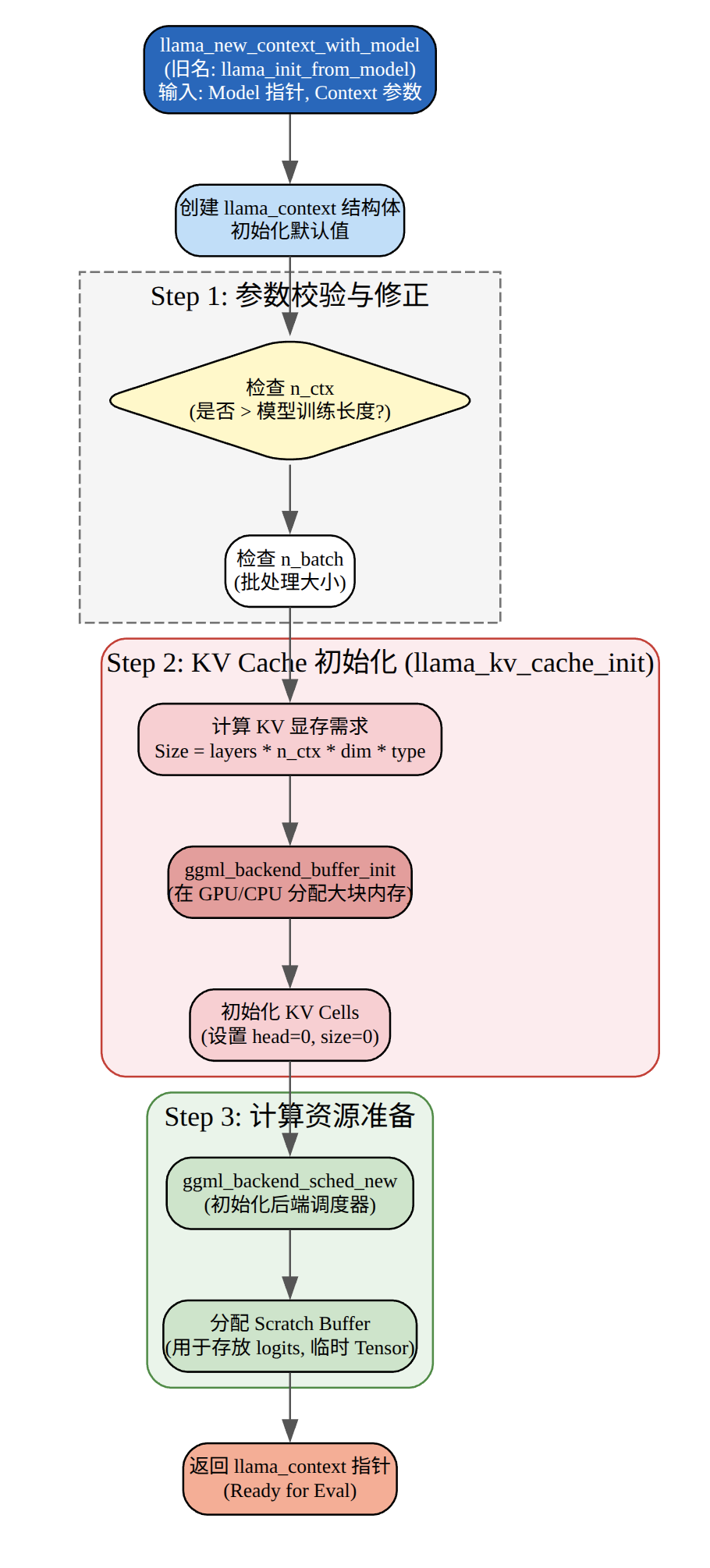
这段代码主要的作用是创建llama_context,用于管理推理的状态KV cache、batch 分配器、backend 调度器等)。
配置上下文参数、batch大小、性能统计。创建llama_context包括初始化计算后端,分配KV cache内存,创建batch分配器和调度器,预留计算图内存。llama_context是推理的核心对象,后续的llama_decode调用都会使用它来管理状态和执行计算。
初始化采样器
    auto sparams = llama_sampler_chain_default_params();
    sparams.no_perf = false;
    llama_sampler * smpl = llama_sampler_chain_init(sparams);

    llama_sampler_chain_add(smpl, llama_sampler_init_greedy());
构造一个“采样器链”(sampler chain),并在其中添加一个贪心采样器(greedy sampler),后面主循环用它从 logits 里选下一个 token。下面按调用顺序拆开。采样器接收一个 llama_token_data_array(包含所有候选 token 的 id、logit、概率),经过处理(过滤、排序、选择等),最终确定一个 token。
处理提示词
    // print the prompt token-by-token

    for (auto id : prompt_tokens) {
        char buf[128];
        int n = llama_token_to_piece(vocab, id, buf, sizeof(buf), 0, true);
        if (n < 0) {
            fprintf(stderr, "%s: error: failed to convert token to piece\n", __func__);
            return 1;
        }
        std::string s(buf, n);
        printf("%s", s.c_str());
    }

    // prepare a batch for the prompt

    llama_batch batch = llama_batch_get_one(prompt_tokens.data(), prompt_tokens.size());

    if (llama_model_has_encoder(model)) {
        if (llama_encode(ctx, batch)) {
            fprintf(stderr, "%s : failed to eval\n", __func__);
            return 1;
        }

        llama_token decoder_start_token_id = llama_model_decoder_start_token(model);
        if (decoder_start_token_id == LLAMA_TOKEN_NULL) {
            decoder_start_token_id = llama_vocab_bos(vocab);
        }

        batch = llama_batch_get_one(&decoder_start_token_id, 1);
    }
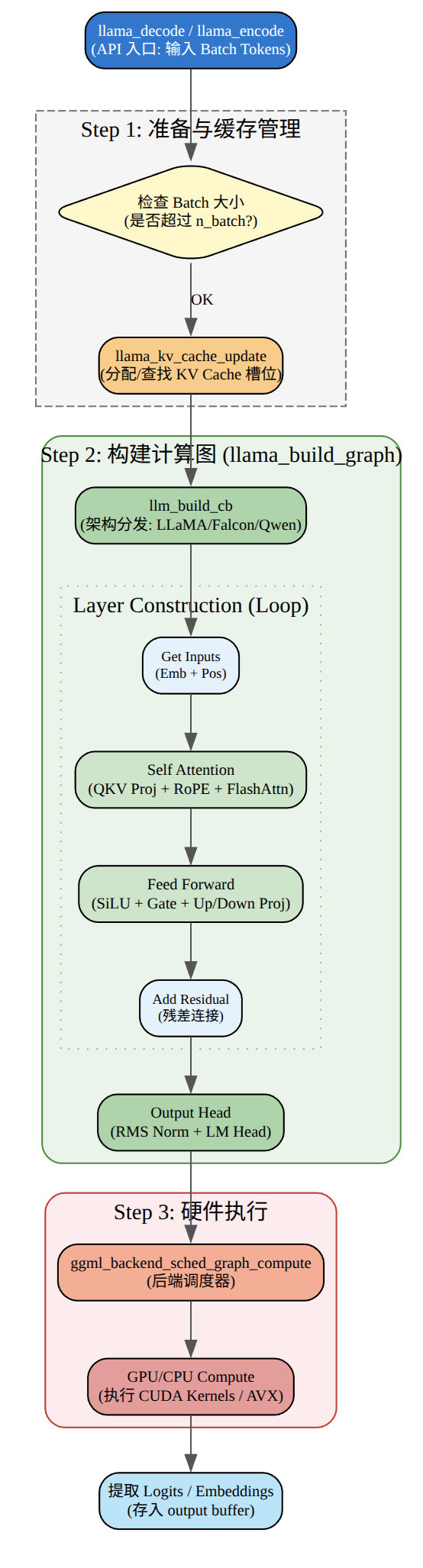
llama_token_to_piece是将token ID转换为文本并输出,llama_batch_get_one是为prompt创建batch结构。通过llama_model_has_encoder检查模型是不是编码-解码模型,如果是先进行prompt,在准备decoder的起始batch。
总结一下就是先调用llama_encode编码prompt的token,做完这一步,encoder部分就结束了,接着让decoder开始工作,我们知道大模型是一个自回归模型,需要有第一个token作为起点,类似机器翻译里的 BOS。
最后的llama_batch_get_one这里就是准备decoder起始batch。
llama_encode
llama_decode
生成循环
    for (int n_pos = 0; n_pos + batch.n_tokens < n_prompt + n_predict; ) {
        // evaluate the current batch with the transformer model
        if (llama_decode(ctx, batch)) {
            fprintf(stderr, "%s : failed to eval, return code %d\n", __func__, 1);
            return 1;
        }

        n_pos += batch.n_tokens;

        // sample the next token
        {
            new_token_id = llama_sampler_sample(smpl, ctx, -1);

            // is it an end of generation?
            if (llama_vocab_is_eog(vocab, new_token_id)) {
                break;
            }

            char buf[128];
            int n = llama_token_to_piece(vocab, new_token_id, buf, sizeof(buf), 0, true);
            if (n < 0) {
                fprintf(stderr, "%s: error: failed to convert token to piece\n", __func__);
                return 1;
            }
            std::string s(buf, n);
            printf("%s", s.c_str());
            fflush(stdout);

            // prepare the next batch with the sampled token
            batch = llama_batch_get_one(&new_token_id, 1);

            n_decode += 1;
        }
    }
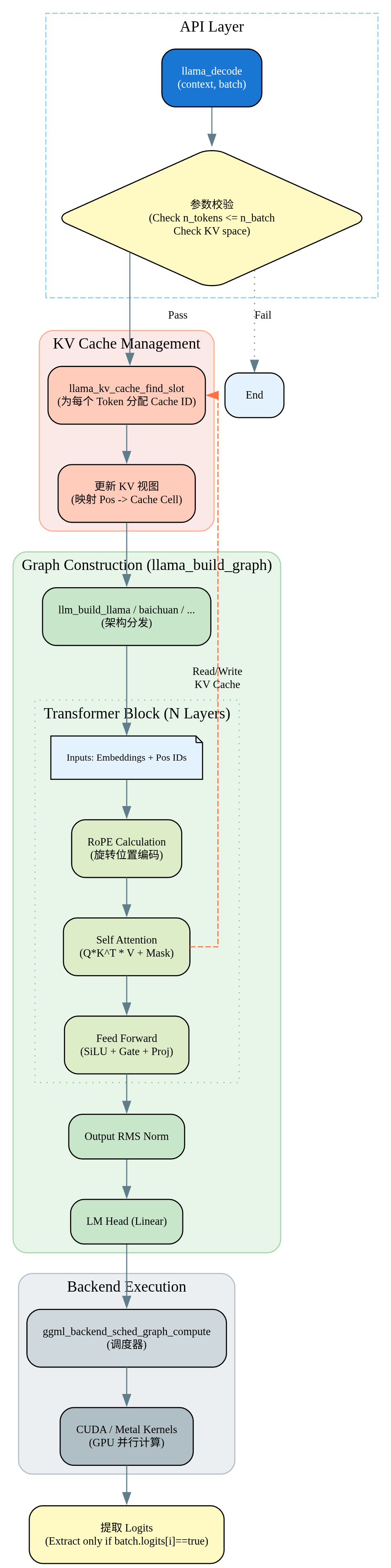
这段代码是自回归文本生成的核心循环,实现decoder->sample->print的循环。llama_decode进行decoder,然后调用llamap_sampler_sample采样下一个token,获取对应的token ID,通过调用llama_vocab_is_eog来检查结束条件,判断采样到的token是否为结束token,是则退出循环。最后调用llama_token_to_piece将token ID转换为文本并打印。
核心的思想其实跟之前写的:从零实现 Transformer:中英文翻译实例文章是一样的。